
Account access
Sagar Club Login
Signing in to Sagar Club takes your phone number and password — nothing else. This page walks through both login options, keeping your account safe on a shared phone, and quick fixes if the door won’t open.
On this page
Before you log in
Have these ready and the whole thing takes ten seconds:
- The mobile number you registered with (without a leading 0).
- Your Sagar Club password — the one you set, not an SMS code.
- A working connection. Mobile data is fine; the login screen is light.
Haven’t got an account yet? Register first — it’s quicker than reading this page.
Sagar Club login with your phone number
- Open the Sagar Club app, or tap Open Sagar Club Login above.
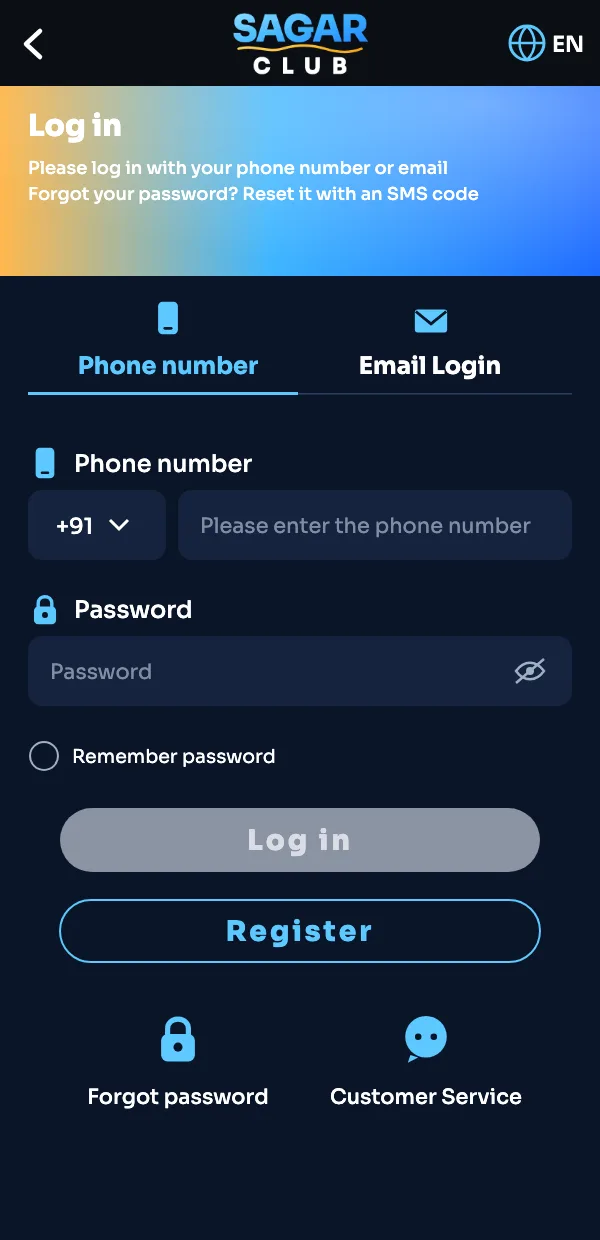
- Stay on the Phone number tab.
- Check the country code shows +91, then type your 10-digit number.
- Enter your password. Tap the eye icon if you want to see what you typed.
- Tick Remember password only if nobody else uses this phone.
- Tap Log in. The lobby opens.
Logging in with email
The second tab, Email Login, is for players who added an email address in their profile. It uses the same password as the phone login. If you never added an email, this tab won’t recognise you — go back to Phone number.
Adding an email is worth doing once you’re settled in. If you ever change SIM cards, it gives you a second way back into the account.
Staying signed in safely
| Where you’re logging in | What to do |
|---|---|
| Your own phone | Tick Remember password. The app keeps you signed in. |
| Shared family phone | Don’t save the password. Log out from Profile when done. |
| Someone else’s phone | Use the browser in private mode and log out afterwards. |
| Cyber café / office PC | Best avoided. If you must, log out and close the browser. |
Sagar Club support will never ask for your password or the SMS code. Anyone who does is not from Sagar Club — here’s how to spot them.
When the login doesn’t work
Nine times out of ten it’s one of these:
- Wrong password — passwords are case-sensitive. Check Caps Lock on a keyboard, or reset it.
- Wrong number — an extra 0 or a typo in the last digits. Retype it slowly.
- Old app version — update the app; old builds sometimes stop talking to the server.
- Weak network — switch between Wi-Fi and mobile data and try again.
Still stuck? The Sagar Club login problems guide goes through every error we’ve seen, and the forgot password page gets you a new password in two minutes.
After you log in
First time in? Three things worth doing before your first game:
- Open Daily Check-in and collect day one — the streak starts now.
- Visit your profile and add an email as a backup login.
- Join the Sagar Club Telegram channel so you see gift codes when they drop.
Then pick a game. If you’re not sure which, our beginner guide suggests an order that makes sense.
Sagar Club login on a computer
Sagar Club is built for phones, but the login works in any modern browser on a laptop too. Open the site in Chrome, Edge or Firefox, click Sagar Club Login and use the same phone number and password. The page simply shows the mobile layout in a wider window. On a shared computer, use a private window so nothing is saved after you close it.
Logging out properly
- Open your profile (the person icon).
- Scroll to the bottom and tap Log out.
- On a browser, close the tab as well.
Logging out matters most on shared phones. It also helps if the app ever behaves strangely — a quick log out and log in clears most minor glitches.
Sagar Club login questions
Can I log in to Sagar Club on two phones?
Yes, but you’ll usually be signed out of the older device. Log in again whenever you switch.
Is the Sagar Club login the same on the app and the website?
Yes. One account, one password, whichever way you open it.
Why does it say ‘account does not exist’?
The number you typed isn’t registered. Check for typos, or register if you never finished sign-up.
Can I change the phone number I log in with?
Yes — in the app go to Customer Service and choose Change phone number. You’ll verify both numbers.